
YOUTUBE: How To Create A Successful YouTube Channel! (A YouTube Masterclass)
Dylan Reeves-Fellows ⭐️ · YouTuber & Professional Editor
A working YouTuber shares real numbers-backed tactics on niching, thumbnails, and SEO, but the pacing is rambling and thin on could-be-taught structure.
This class positions itself as a masterclass but plays more like a highlight reel of things one YouTuber picked up along the way. Dylan Reeves-Fellows, who built a student-life channel to 46,000 subscribers, walks through branding, thumbnails, gear, editing, and the algorithm in eleven short lessons. The advice is real and field-tested, but the delivery leans heavily on personal anecdote and loose narration rather than a taught sequence a beginner can replicate step by step.
What actually gets taught
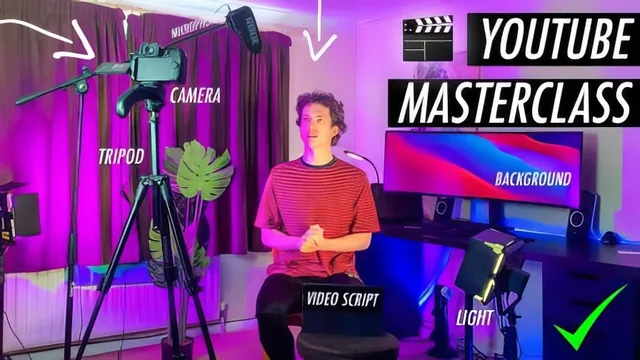
The opening lessons are the strongest. The case for picking three content pillars, illustrated with his own shift from a laser-focused student-vlog channel to a broader one after graduating, gives a genuinely useful before-and-after: growth slowed once the content got less specific. The branding lesson that follows breaks channel art into three concrete parts (channel name, upload schedule, personality), which is a checklist a new creator can act on immediately. The gear walkthrough is similarly grounded: an overhead mic on a $28 stand, a softbox for diffused light, and colored backlighting to separate the subject from the wall, each explained with the reasoning for why it matters rather than just a shopping list.
The editing lessons are where the course gets uneven. The gain-stepping technique, lowering music under a title card in small increments so it swells and fades naturally around speech, is a real, specific skill worth the price of admission on its own. But the same lesson spends significant time on downloaded Premiere Pro title-card templates and on-screen "like this video" graphics, framed as an algorithm hack, which reads as dated advice rather than craft. The bonus lesson is mostly a promotion for the instructor's separate hour-long editing class, adding little to this one.
Where it thins out
The algorithm lesson on titles, descriptions, and tags is practical in outline (mine YouTube's autocomplete for real search terms, then work those phrases into a paragraph-style description) but never goes deeper than "search a phrase, see what comes up, reuse it." There is no walkthrough of analytics, no explanation of watch time or audience retention, and no mention of how thumbnails and titles get tested against each other. The case study lesson, meant to show editing principles in action, instead drifts into a several-minute personal story about a tattoo parlor and a university tier-list video with little instructional payoff.
The class project asks students to submit their channel art and thumbnails for feedback, which is a reasonable idea but depends entirely on the instructor actually reviewing submissions, something the course itself cannot guarantee. At forty minutes total, several lessons feel padded with tangents rather than compressed into tight, replicable lessons.
This is a fast, honest primer from someone who has actually grown a channel, useful for absorbing a few specific habits (niche focus, the gain-stepping trick, the overhead mic placement) in under an hour. It is not a structured curriculum, and viewers wanting a rigorous walkthrough of editing software or analytics should look elsewhere.
The standout
Stepping down music gain clip by clip around dialogue, rather than one flat volume automation, is a specific, transferable editing habit most beginners skip.
What you will learn
- How to narrow a channel to three consistent content pillars instead of posting random, unrelated videos
- How to build channel art, a profile picture, and thumbnails that signal brand and topic at a glance
- A basic budget camera and audio setup (overhead mic on a cheap stand, softbox and colored backlighting) that upgrades footage past phone quality
- How to duck background music under dialogue by splitting clips and stepping down gain in small increments
- How to mine YouTube's autocomplete search bar for keywords to seed titles, descriptions, and tags
- Why on-screen like reminders and playlists are used to nudge the recommendation algorithm
Best for: A brand-new or very early YouTuber who has not yet thought about niche, branding, or basic camera/audio setup.
Skip it if: Anyone who already uploads consistently and wants scripted, step-by-step editing or SEO tutorials rather than anecdote-driven advice.