
Storyboarding for Animation: How to Illustrate and Design for Successful Motion
Sarah Beth Morgan · Director + Illustrator
A polished 66-minute walkthrough of client-facing creative decks, but it teaches presentation craft more than storyboarding technique.
Sarah Beth Morgan's class is not really a storyboarding course in the technical sense. It is a case study in how one freelance art director structures a client pitch, using a fictional brief for a company called Floaty McFloat as the through-line. That distinction matters for anyone deciding whether to spend the hour here.
The arc is genuinely well-sequenced. It opens with brief deconstruction: reading a client's script and reference images out loud, underlining timeline and budget cues, and translating vague requests like "nostalgic summer fun" into usable creative direction. From there it moves into mind-mapping, where the brief's core elements get spidered out into concrete visual ideas (a pizza-shaped pool floaty, a synchronized-swimming transition). Only after that groundwork does the class touch anything resembling a storyboard.
The storyboarding section itself
When storyboarding finally arrives, in lessons seven and eight, the method is straightforward: paste the script into a numbered 16:9 template, annotate each line with rough shot descriptions (medium shot, match cut, camera pan), then thumbnail the action at a deliberately ugly, fast sketch level before refining for client presentation. The advice to leave transitions loosely implied, rather than fully illustrated, so an animator has room to interpret them, is a useful and specific piece of craft wisdom, and one of the few moments where the class speaks to animation production rather than deck design.
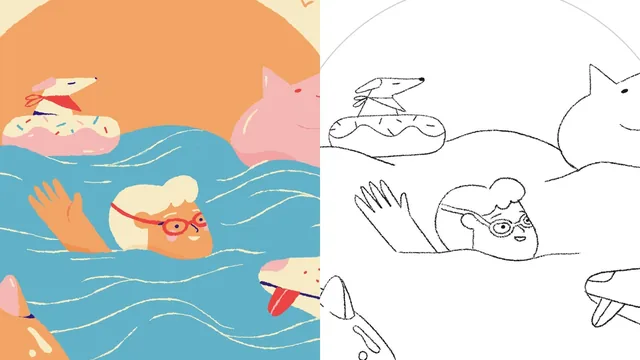
The style frame lesson is the strongest technical segment. It walks through building a single storyboard panel into a full-color illustration, and the emphasis on color-blocking before detailing, then organizing every element (background sun, water, midground character, foreground floaties) into its own labeled layer group, is a real, transferable habit for anyone handing files to an animator. It is a small technical payoff buried in an otherwise soft-skills class.
Where it falls short
The bulk of the runtime, easily half the class, is spent on the mood board and the final "polishing your treatment" deck: writing hello pages, choosing two adjectives to describe a style direction, adding a thank-you page, deciding where to place a client's name on each slide. This is legitimate professional practice, but it is deck formatting, not illustration or animation skill-building. Anyone expecting to learn shot composition, timing, staging, or camera language for animation will find only passing references to those concepts.
The class also leans heavily on one single project example throughout, which keeps the lessons concrete but means there is little exposure to how the process flexes for a different kind of brief, a different medium, or a tighter budget. The advice to simplify (fewer characters, more cuts, less background) when time or money is limited is mentioned once and not explored.
As a primer on running a freelance creative-planning process end to end, from brief to deck to a single polished style frame, this succeeds. As a class specifically about storyboarding craft for animation, the title oversells what is covered.
The standout
The color-blocking step, where flat color shapes are locked in and organized into clean, separately grouped layers before any detail is added, specifically so an animator can manipulate sun, water, and character elements independently in After Effects.
What you will learn
- How to break down a client brief into timeline, budget, tone, and visual cues before starting any design work
- Building a mind-map from a script to generate concept directions and story beats
- Assembling a two-track mood board (e.g. bold/geometric vs. handmade/organic) to give clients real style choices
- Converting a script into a frame-by-frame storyboard template, moving from rough thumbnails to client-ready sketches
- Building one storyboard frame into a full color-blocked style frame with animator-friendly layer organization
- Structuring a complete client treatment deck, from hello page to final polish and sign-off copy
Best for: Freelance illustrators or junior motion designers who already draw but have never structured a client pitch deck or storyboard workflow.
Skip it if: Anyone looking to learn actual animation principles, timing, or After Effects technique, since the class stays entirely in the pre-production planning and illustration stage.