
Mastering Logo Design: Gridding with the Golden Ratio
George Bokhua · Digital Graphic Designer & Illustrator
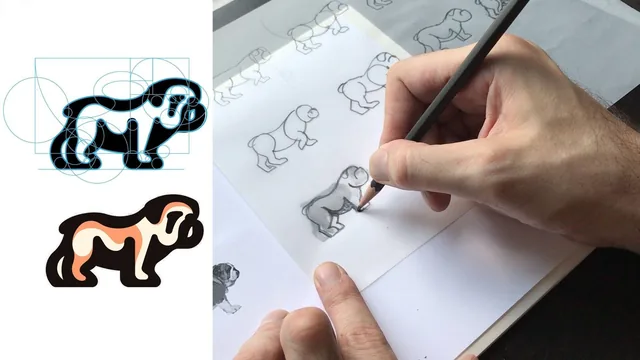
A focused 44-minute walkthrough of how George Bokhua actually grids a finished logo sketch around the golden spiral, not just theory about the ratio.
George Bokhua's "Mastering Logo Design: Gridding with the Golden Ratio" is a compact, single-project class built around one real demo: turning a rough bulldog sketch into a fully gridded, gold-section-informed logo mark in Adobe Illustrator. At 44 minutes across twelve short lessons, it moves fast and assumes the viewer already knows their way around Illustrator's pen and anchor tools. This is not an introduction to logo design or to the golden ratio's history. It is a narrow, technique-specific follow-up to Bokhua's earlier grids class, aimed at designers who already have a mark roughed out and want to know what to do next.
What the class actually teaches
The arc is straightforward: find a reference image with a clear, recognizable silhouette, trace it by hand on paper into simplified geometric shapes (Bokhua repeats "circle, ellipse, spiral" as the entire vocabulary), import that sketch into Illustrator, then overlay a golden spiral template to find natural gridding points across the form. The gridding lesson itself is the heart of the class: Bokhua builds the spiral once, then shows how to rotate and scale it against different parts of the bulldog (stomach, face, ear, tail) to locate where the proportion already exists in the sketch rather than forcing it in. From there, the class walks through cutting shapes at their intersection points, rejoining them into one continuous outline, and cleaning up anchor points until the silhouette reads smoothly at a distance.
What sets this apart from a purely decorative tutorial is the explicit permission to abandon the grid when it stops serving the design. Several times, Bokhua backs away from a grid-perfect join because it produces a visually awkward angle, and corrects it by eye instead, checking negative space rather than measurements. That is a useful, honest admission for a class built around a mathematical proportion: the golden section is a starting scaffold, not a rulebook, and the finished bulldog mark is judged on whether it reads as a bulldog and feels fluid, not on how faithfully it traces the spiral.
Where it works and where it thins out
The demo format is also the class's main limitation. There is no separate lesson on what the golden ratio is or why 1.618 recurs in design and nature beyond a couple of quick example marks (a swan, a beagle) and a nod to an owl's eye socket, so viewers hoping for grounding in the concept before applying it will be disappointed. The "Understanding Golden Sections" lesson is really a highlight reel of Bokhua's past work rather than an explanation, and the class leans on the assumption that watching one bulldog get gridded will transfer to other animals and mark types.
The color lesson is barely a lesson at all, a brief pass at adding shading for volume with little explanation of the choices being made. And because the entire class is one continuous project, anyone who gets lost at the cutting-and-joining stage in the middle has no alternate example to check their understanding against.
Still, for the audience it is built for, designers who already sketch and understand Illustrator's vector tools but have never systematically applied golden-ratio gridding to a complex mark, this delivers exactly what the title promises. It is honest about the amount of iteration real gridding takes (Bokhua repeatedly stresses hours, not minutes, and revisiting work after a break), and the finished technique is genuinely reusable on any animal or object mark with a clear side-view silhouette.
The standout
The repeated instruction to prioritize the initial illustrator sketch over the grid itself, and to correct by eye whenever a grid-perfect join looks visually wrong, is the one principle that separates decorative gridding from usable logo design.
What you will learn
- How to build a golden spiral shape in Illustrator from scratch and reuse a saved template file for future projects
- How to pick a clean reference photo based on animal silhouette before sketching
- How to trace a reference by hand into simplified circle, ellipse and spiral forms before touching Illustrator
- How to lay a golden spiral and matching circles over an existing rough mark to find natural gridding points
- How to cut, realign and join grid shapes into one continuous vector outline using the pen and anchor tools
- How to judge when a mark is fully gridded versus overworked, and when to trust the eye over the grid
Best for: Intermediate-to-advanced logo designers and illustrators who already sketch and use Illustrator's pen tool comfortably and want a repeatable structural technique for complex marks.
Skip it if: Beginners with no Illustrator experience or anyone hoping for a broad theory lesson on the golden ratio's history and math, since this class is almost entirely a single hands-on demo.