
Make AI Work for You: Break Creative Block
Smitesh Mistry · Illustrator & Designer
A tight, single-project walkthrough of prompting ChatGPT and Adobe Firefly to break creative block, not a general AI-art tutorial.
Smitesh Mistry's class runs a single idea from start to finish: use ChatGPT as a brainstorming partner and Adobe Firefly as a reference generator, then let both feed into one finished illustration about creative block itself. The 44 minutes are structured as a straight pipeline, prompt generation, sketch, reference pull, refinement, coloring, finishing, with no detours or theory lessons padding it out.
The prompting method is the real content
The most useful stretch of the class is the ChatGPT section, where Mistry does not just type "give me an idea" and take the first result. He starts with a broad prompt, picks the specific numbered response that resonates, then asks ChatGPT to generate four more ideas based on that single point. He repeats this narrowing process two or three times, each round folding in a phrase from his own style, until he lands on a character standing in a vast, empty landscape facing a blank canvas. This iterative narrowing, treating the AI like a brainstorming partner you redirect rather than a vending machine, is a transferable habit that applies well beyond illustration.
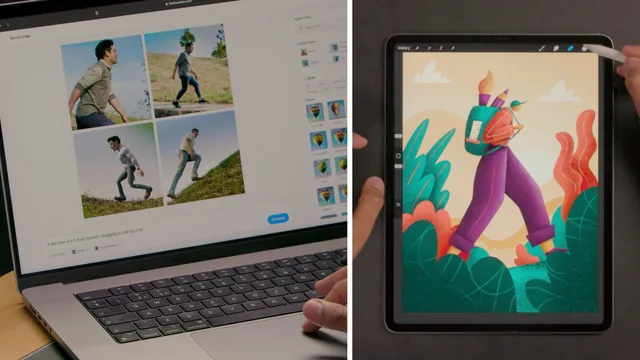
The Firefly section is thinner by comparison. Mistry searches for a "side view of a male character walking up a hill," adjusts the style filter between photo, graphic, and art, and screenshots the result to trace over at reduced opacity. It works as a demonstration of using AI output as a skeleton reference rather than a finished asset, but the tool itself gets only a few prompt variations before he moves on. Anyone hoping for a broader tour of Firefly's capabilities, its other generation modes, upscaling, style transfer, will not find it here.
Strong on structure, thin on drawing instruction
The drawing portions that follow, sketching, refining, coloring, and finishing, are competent but assume real proficiency already. Mistry moves fast through building a skeleton over a reference image, adjusting proportions to his signature long-legged, small-headed style, and separating each body part onto its own layer for shading. He explains his logic, foreground elements darker than background ones, shadows falling away from the light source, rim lighting achieved by erasing rather than adding, but he does not stop to teach basic anatomy, color theory, or Procreate fundamentals. A beginner will follow the AI-prompting logic fine and then get lost the moment he starts laying down brushstrokes.
The finished piece, a character dwarfed by hills and foliage, sun rising behind him, functions well as a proof of concept for the method rather than as an ambitious showcase piece. That is honest framing for what the class actually delivers: a workflow, not a mastery course in illustration technique.
Where the class earns its keep is in reframing creative block as a prompting problem. Mistry's closing point, that this AI-brainstorming loop transfers to photography, songwriting, or any other creative field facing a blank page, holds up because the technique he demonstrates really is generic enough to port elsewhere. At under an hour, with a downloadable prompt list included, it costs little to try and delivers a specific, repeatable method rather than vague inspiration talk.
The standout
The technique of feeding ChatGPT's own generated ideas back into the conversation, asking it to expand on one specific point rather than starting a fresh prompt each time.
What you will learn
- How to structure iterative ChatGPT prompts, starting broad and narrowing by referencing specific numbered ideas the AI already generated
- How to phrase prompts around your existing style and subject matter rather than generic requests
- How to use Adobe Firefly to generate pose and composition reference images for a specific character action
- How to build a sketch skeleton from an AI reference image, then adjust proportions to match personal style
- How to organize an illustration into separate layers by element for easier shading, highlights, and rim lighting
- How to apply a foreground-darker, background-lighter approach to color and depth
Best for: Illustrators who already have a personal style and drawing ability but need a repeatable method for turning vague AI suggestions into a finished piece.
Skip it if: Complete beginners with no drawing experience, or anyone expecting a deep dive into Firefly's or ChatGPT's broader feature sets.