
Logotype Masterclass with Jessica Hische
Jessica Hische · Letterer and Illustrator
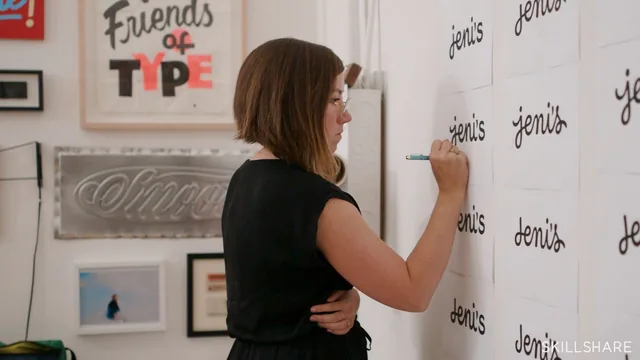
Jessica Hische walks through her literal client checklist for refining logotypes, using a real Jeni's Splendid Ice Creams rebrand as the case study.
A checklist, not a technique dump
Jessica Hische frames this course around a single problem: what do you actually check before calling a logo finished? Rather than teaching logo design from first principles, the class hands over the literal audit she runs on every brand refresh, moving from macro questions (does the hierarchy read, does the white space feel balanced, could any shape be accidentally offensive) down to letterform-level details like baseline consistency, overshoot on rounded characters, and stroke angle. The structure mirrors how she says she actually works: print it out, pin it to a wall, write down every flaw, then fix them in order of scale. That discipline of big-picture-first, details-second is the course's real backbone, and it holds up as a genuinely useful way to stop tinkering with serifs before the layout problems are solved.
The most practical single idea is the volume test for hierarchy: read each word in a logo at the loudness implied by its type size, so an oversized "the" next to a small "countdown" immediately exposes itself as wrong. It costs nothing to apply and works on any composition, not just logos.
The Jeni's case study carries the second half
Once the checklist is established, the course pivots to Hische's real rebrand of the Jeni's ice cream logotype, and this is where the class earns its keep. She walks through the original script logo's actual problems: an apostrophe standing in for a dot on the "i" that reads as a semicolon, a heavy entrance stroke on the J that can misread as a P, and specifically, a shape that consumer feedback said misread as male anatomy. Watching her reason through fixes for a real, named, reputational problem, rather than a hypothetical exercise, gives the checklist teeth. The sketch-to-vector sequence that follows is honest about process: she traces loosely in Illustrator, leaves "carrots" (extended points) for easy later edits, and treats the vector work as clay to carve rather than a precision task to nail on the first pass.
The small-scale adjustment lesson closes the loop by showing why a logo that works large can fail small, tight kerning needs opening up, low x-heights need lifting, fine loops need simplifying, which is a distinction most beginner logo tutorials skip entirely.
Where it thins out
The course assumes real fluency already. The Illustrator segment names the pen tool and a remapped keyboard shortcut (pen tool moved to S) without walking through Illustrator's interface for anyone who hasn't opened it before, so newcomers will need a separate class just to keep up. The checklist itself, while thorough, is delivered verbally with no on-screen worksheet walkthrough during the lesson, so retention depends on the downloadable resource rather than the video teaching it visually. At 92 minutes, the pacing is efficient rather than padded, but the case study leans on one project type (a hand-lettered script mark), so designers refreshing a sans-serif wordmark will have to translate the specific advice about ligatures and pen-influence themselves.
For an intermediate-to-advanced letterer or brand designer who already has opinions about type but wants a formal way to defend them in a client critique, this is a strong, efficient watch. For someone who has never opened Illustrator or doesn't yet know what kerning means, it will feel like being handed the answer key to a test they haven't studied for.
The standout
The volume-reading trick, whispering small type and shouting large type to instantly reveal a broken hierarchy, is a fast, transferable diagnostic anyone can apply immediately.
What you will learn
- A repeatable checklist for critiquing a logotype at the big-picture level (hierarchy, white space, sensitivity gut-checks) before touching letterforms
- How to audit letterform consistency across letter style, baseline, spacing, width, height, weight and stroke angle
- How to test type hierarchy by reading words aloud at the volume their scale implies
- How to sketch and then vectorize a logo refresh in Adobe Illustrator using the pen tool and direct-select shortcuts
- How to adjust a logo for small-scale legibility by opening spacing, raising low x-heights and simplifying fine detail
- How to keep a brand's original personality intact while fixing its technical flaws
Best for: Working designers and letterers who already draw logos and want a structured critique process for client refresh work, not people learning type design from zero.
Skip it if: Absolute beginners with no prior exposure to Illustrator's pen tool or basic typographic vocabulary, who will find the vectorizing section moves too fast.