
Kinetic Typography Rotation - After Effects Animation
Klarens Malluta · Visual Artist
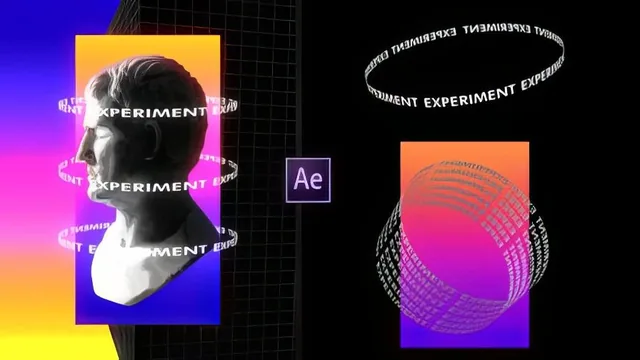
This 24-minute course teaches exactly one effect, CC Cylinder typography rotation, and teaches it fast, loosely, and only once.
Kinetic Typography Rotation promises a specific, narrow outcome: a spinning-tube text effect built primarily around After Effects' CC Cylinder filter, and it delivers exactly that in well under half an hour. Malluta opens by showing a handful of Dribbble reference clips, some built in Cinema 4D, to illustrate what "kinetic typography rotation" looks like, then spends the rest of the course rebuilding a simplified version of that look entirely inside After Effects.
The core technique is straightforward once demonstrated: type a short word, apply the Expand effect to stretch it left and right until it tiles the full width of a composition, precompose it, then wrap that precomposed layer around a CC Cylinder to turn a flat line of text into a rotating band. Keyframing the cylinder's Y rotation across a handful of frames produces the seamless spin loop. This first lesson is the clearest and most complete piece of instruction in the course, and on its own it gives anyone already fluent in After Effects enough to reproduce the effect.
The middle lessons scale the same idea into a six-row grid, using null objects as parents so half the rows scroll left and half scroll right, then color the background with a gradient layer shifted over time via a Hue/Saturation adjustment layer keyframed from zero to full rotation. It is a serviceable way to add a moving color wash behind the typography, though the explanation mostly stays at the level of adjusting values until they look right, rather than explaining what those hue and saturation numbers are actually doing to the image.
The most interesting application arrives in the poster lesson, where the same cylinder text wraps around a photographed statue, and an inverted mask hides the portion of the rotating band that crosses in front of the subject. The result is a convincing illusion that the text physically orbits behind the object, and that masking trick alone justifies the runtime for anyone who wants to add spinning labels or taglines around a product shot or portrait. Notably, the poster's base artwork is not part of the lesson. Malluta explicitly defers that to other tutorials and treats the composite as a given, so viewers only learn the typography layer, not how to build the poster around it.
The course closes with a quick color-grading pass, a white solid set to an alpha-matte blend plus a glow effect for a retro finish, which reads as a nice touch but gets barely more than a sentence of explanation.
Given the beginner label, the pacing is a mismatch. The course moves through precomposing, parenting, and masking without pausing to explain those foundational moves, so anyone new to After Effects will likely lose the thread in the middle lessons even though the underlying concepts are not difficult once understood. For someone who already knows their way around the software, though, this is a fast, usable way to pick up one distinct, reusable effect and see it applied to a real design context rather than a generic demo. It is not a course to learn After Effects from, but as a focused add-on technique for an existing skill set, it does what it sets out to do.
The standout
The poster lesson's inverted mask trick, which makes rotating cylinder text appear to physically wrap behind a photographed subject, is the single technique worth the whole runtime.
What you will learn
- Building a basic rotating-text loop with the CC Cylinder effect and keyframed Y rotation.
- Using the Expand effect to stretch a single text layer into a full-width tiled row.
- Grouping multiple text rows under null objects to animate opposing left and right scroll directions.
- Animating a color gradient background with a Hue/Saturation adjustment layer keyframed over time.
- Fine-tuning 3D rotation parameters (radius, X/Y/Z rotation) so the spin loops cleanly.
- Using inverted masks to make spinning typography wrap convincingly around a poster's central subject.
Best for: Editors already comfortable with After Effects fundamentals like precomposing, parenting, and masking who want a quick, narrow recipe for one specific spinning-text look.
Skip it if: Complete After Effects beginners, since the course moves through precomposing, null-object parenting, and masking without explaining any of it, despite its beginner label.