
Graphic Design Mastery: The Complete Branding Process
Lindsay Marsh · Over 500,000 Design Students & Counting!
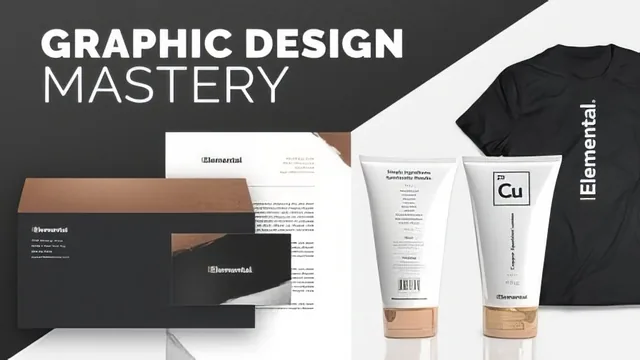
A working designer walks you through a full branding project start to finish, but the pacing rewards patience more than curiosity.
A full branding project, watched in real time
This course follows one fictional brand, a metallic shimmer lotion called Elemental, through nearly every deliverable a design studio might produce for a client: logo, color palette, packaging, ads, and a website wireframe. The structure is genuinely comprehensive. It opens with logo exploration in Illustrator, typing out the brand name in different weights and treatments, testing a periodic table inspired box motif, then abandoning it once the balance between symbol and type stops working. From there it moves into branding standards, packaging layout for a run of lotion bottles, a detour into Adobe Dimension for 3D product rendering, print and digital ad design, and finally a low fidelity website wireframe built in Adobe XD.
The logo section is the strongest stretch. Watching a concept get built up and then discarded, the boxed periodic-table letter mark, the tightened tracking on Avenir, the manual softening of anchor points after converting type to outlines, is a rare look at how a working designer actually thinks through a decision rather than arriving at a finished answer. The reasoning behind small choices, like why lowercase letters need tighter tracking than uppercase, or why creating outlines on type is a one-way door that should happen late in the process, is the kind of judgment call that separates this from a basic tool tutorial.
Where the pace slips
The packaging and ad sections lean harder on repetition than instruction. A significant chunk of time goes to resizing and recoloring the same ad layout for gold, copper, and silver variants, useful for seeing a system applied consistently, but thin on new technique once the pattern is established. The Adobe Dimension section is a highlight conceptually, but the walkthrough of building the 3D render itself moves quickly and assumes a viewer can keep up without much orientation to the software's own interface.
The Adobe XD section closes the course by teaching the tool from the ground up, which is generous given the class's advertised intermediate level, but it means a viewer who came for logo and branding work sits through basic wireframe blocking and repeat grid setup before reaching anything specific to this brand. The website section does deliver a real payoff: a clickable prototype with auto animate transitions between a product page and a shopping cart dropdown, linked into a working click through demo a designer could show a client.
Across all eighteen lessons the course rarely stops to summarize or reinforce what was just covered. It plays out like a recorded working session, useful for absorbing process and decision making, less useful as a reference to revisit for a specific technique. Anyone without prior comfort in Illustrator's layering and pen tools will struggle to keep pace, since the class does not pause to explain basic panel navigation. For an intermediate designer who wants to see a full branding pipeline modeled from a real practitioner's workflow, start to finish, it delivers exactly that. For anyone hoping for tightly edited lessons organized around single techniques, the loose, in-the-moment pacing will feel like a lot of sitting through trial and error to reach the useful parts.
The standout
The Adobe Dimension workflow, taking a flat package label and wrapping it onto a 3D lotion bottle to generate ad ready product renders, is the one segment with no easy substitute elsewhere.
What you will learn
- How to iterate logo concepts in Illustrator through typography experiments, custom letterforms, and outline editing
- How to build a cohesive brand system: color palette, logo variations, and light/dark background adaptations
- How to lay out packaging copy and hierarchy, including regulatory text like warnings and barcodes
- How to use Adobe Dimension to render a 3D product mockup from a flat package design
- How to design print and digital ads with consistent typography, color, and layout across variations
- How to build a clickable low fidelity website wireframe and prototype in Adobe XD, including auto animate transitions
Best for: Designers who already know their way around Illustrator and Photoshop and want to see how a real branding project gets assembled end to end, not taught its basics.
Skip it if: Beginners who haven't yet learned Illustrator or Photoshop tools, and anyone wanting tight, editing heavy lessons rather than a real time working session.