
Filming Scene Transitions: Creative Techniques on a Budget
Matty Brown · Filmmaker
A 47-minute walkthrough of four camera transitions from a Vimeo-award filmmaker, built for editors who already own a camera and want texture, not theory.
What it actually teaches
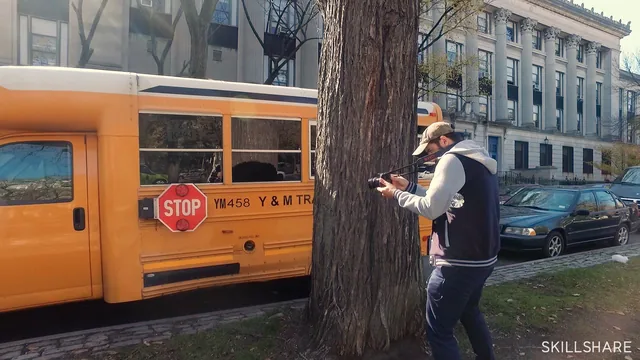
Matty Brown's course is built around four named transitions: the whoosh, the seamless reveal, into black, and the match cut. Each gets the same two-step treatment, a shooting segment filmed on a walk around Brooklyn, followed by an editing segment where Brown pulls the same footage into his timeline and shows what worked and what did not. The whoosh is a whip-pan that blurs the frame enough to dissolve into the next blurred shot. The seamless reveal uses a foreground object, in one case a tree, in another a school bus, to fill the frame before the next scene emerges from behind it. Into black pushes the lens into a solid color or texture, in this case a cluster of wall-mounted faces, so the following shot can open on the same tone and read as a continuation. The match cut lines up an object's position and size across a hard cut, demonstrated on a row of park trash cans, with a strip of tape marking the target spot in frame as a physical reference.
The course is short, and it uses that time efficiently. Brown treats transitions as a shooting problem before an editing problem, and repeats that point until it lands: a static, uncomposed shot gives an editor nothing to dissolve into, so the camera operator has to plan the movement on location. That framing is the most useful idea in the course, more useful than any single technique, because it reorients how a viewer will hold their camera on their next shoot.
Where it thins out
The editing lessons are less rigorous than the shooting ones. Brown works in Sony Vegas and narrates his choices in real time, including footage that fails and gets discarded, which is honest but leaves a beginner without a clean, repeatable recipe. There is no discussion of exact frame counts for a whoosh blend, no crop or scale workflow beyond eyeballing two clips against each other, and no attention to keyframing dissolves in a specific NLE beyond Vegas. Someone editing in Premiere or DaVinci Resolve will need to translate every step themselves. The match cut sequence is the clearest technical demonstration in the course, because the tape marker gives a concrete, transferable method; the into-black sequence is the weakest, since lining up five faces by nose position feels more like watching Brown solve a puzzle than being taught a process.
The course also leans heavily on Brown's own footage and instinct, with statements like "just play around like a kid" standing in for structured guidance more than once. That fits his stated teaching philosophy, that filmmakers should understand every part of the craft through direct experimentation rather than formula, but it means the course rewards a viewer who already has decent camera handling and shot composition instincts. A true beginner without those fundamentals may come away with the concepts but not the muscle memory to execute them cleanly on a first attempt.
At 47 minutes across nine short lessons, this sits closer to a demonstration reel with commentary than a structured course. It delivers real, specific, budget-friendly techniques worth trying on a weekend shoot, and the shoot-for-the-edit mindset alone justifies the time. Anyone hoping for a software-agnostic step-by-step or exact technical specs should look elsewhere.
The standout
The taped-reference-point trick for match cuts, a simple physical marker that turns a notoriously fiddly technique into something repeatable on a low budget.
What you will learn
- How to shoot the 'whoosh' transition by whip-panning the camera on its axis to create a motion blur that dissolves into the next shot
- How to execute a 'seamless reveal' by moving behind an object (a tree, a bus) until it fills the frame, then emerging into the next scene
- How to build an 'into black' transition by pushing into a single-color or single-texture surface and matching it on the next clip
- How to line up a match cut using a taped reference point so an object's position, size and shading match across a hard cut
- How to organize raw transition footage into groupings on the timeline before deciding which pairings actually work
- Why transitions are shot, not just edited, and how to plan camera movement on location for the cut you want later
Best for: Beginner to intermediate solo filmmakers and hobbyist editors who already shoot handheld video and want a small, repeatable toolkit of in-camera transitions.
Skip it if: Anyone wanting narrated software steps, precise timing values, or a structured editing tutorial rather than a loose behind-the-scenes demonstration.