
Fauxsaics in Procreate: Make A Digital Mosaic Illustration
Molly Suber Thorpe · Calligrapher & Designer
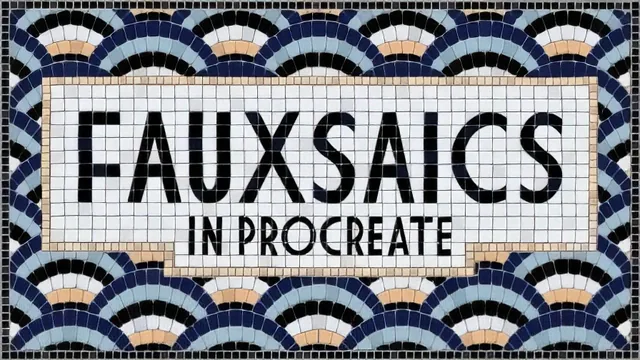
A meticulous, three-method walkthrough for faking convincing 3D mosaic tiles in Procreate, if you have patience for tedium.
Molly Suber Thorpe's fauxsaics class is less a single project tutorial than a full technique manual for one specific illustration style: digital mosaics built entirely out of layers, masks, and a custom brush set. The course moves in a clear arc, from typing or hand lettering a word, through cutting it into tiles, coloring those tiles individually, and finally layering in enough fake shadow and texture that flat vector-like shapes start to read as glazed ceramic sitting under real light.
The core build
The heart of the class is the tile-cutting method: a single letterform gets a layer mask, and a tile-cutter brush chops that mask into rough squares and triangles, which is deliberately imprecise, since Thorpe treats slightly uneven cuts as part of the rustic mosaic look rather than a flaw to fix. A second ring of tiles gets drawn around the first with an airbrush template, then cut the same way, and a background pattern fills in everything else using one of fifty included pattern brushes. Individual tile recoloring is where the class earns its intermediate label: the automatic selection tool, tuned with a selection threshold and a feather amount, isolates single tiles inside a busy pattern so they can be filled one at a time without bleeding into neighboring grout lines. It's fiddly, repetitive work, and the class doesn't pretend otherwise.
Making it look real
The strongest material in the course is the dimension work. Duplicating a tile layer, filling one copy off-white and one black, nudging each slightly toward opposite corners, then running Gaussian blur and setting them to darken or multiply, is a genuinely transferable Procreate lighting trick that goes well beyond mosaics. Stacking a second darken pass with reduced opacity to round off tile edges, then scattering random light and dark recolors across individual tiles so no two same-colored pieces match exactly, pushes the illusion further. A later lesson swaps flat fills for actual painted texture, multiplied back over the color layers, producing a hand-glazed look that is the most visually distinctive result in the class.
Three build methods are covered rather than one: the hybrid hand-cut-and-brush approach that anchors most of the runtime, a faster grid-brush method for simpler geometric designs, and a fully freehand approach for anyone who wants to skip the brush pack entirely. That range is a genuine strength, since it means the techniques scale from a quick geometric floor pattern to an intricate lettered piece. The closing lesson on compositing a photographic feet overlay onto the finished mosaic, complete with a masked cutout and a properly blurred cast shadow, is a nice bonus for anyone building a portfolio shot rather than just a flat export.
The class assumes real Procreate fluency going in. Layer masks, clipping masks, alpha lock, and blend modes are used constantly and explained only briefly, so a true beginner will lose the thread quickly despite the "intermediate" label undershooting how much prior knowledge is expected. The pace is also unapologetically tedious in the middle section, with long stretches of tile-by-tile recoloring that reward patience more than creativity. For anyone who already enjoys that kind of meditative, detail-heavy digital painting, though, the payoff, tiles that genuinely look three-dimensional and hand-glazed, is well earned.
The standout
The offset white-edge-and-shadow layer trick, blurred and set to darken or multiply, that turns flat colored tiles into convincingly three-dimensional inlaid stone.
What you will learn
- Non-destructive tile cutting using layer masks and a custom tile-cutter brush instead of an eraser
- Building a layered fauxsaic around hand lettering or typed text, with framing tile rows and a filled background pattern
- Selecting and recoloring individual tiles precisely with the automatic selection tool, adjusting threshold and feathering for clean edges
- Faking three-dimensional depth by offsetting white-edge and shadow copies of a layer, then blurring and blending them with darken and multiply
- Simulating hand-painted grout and glaze with painterly texture overlays set to multiply or color burn
- Compositing a photographic feet overlay onto the finished mosaic, complete with masked cutout and matched cast shadow
Best for: Intermediate-to-advanced Procreate users, especially lettering artists, who enjoy slow, detail-oriented layer work and want a distinctive, texture-rich illustration style.
Skip it if: Beginners still learning Procreate's basic tools, or anyone hoping for a quick, low-effort result rather than an hour of tedious tile-by-tile recoloring.