
Explorative Design: Develop Your Style Rapidly and Sustainably
Rich From TapTapKaboom · Multi-hyphenate Artist
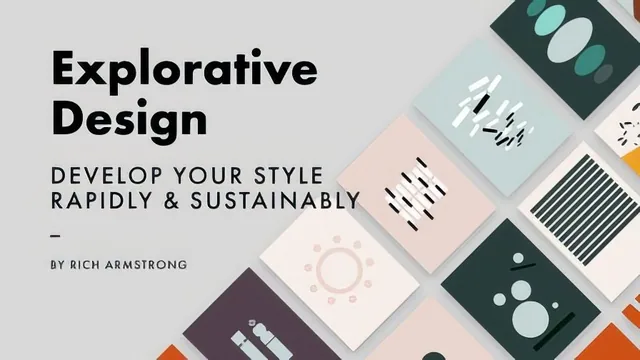
Ten guided 10-minute Illustrator exercises turn abstract advice about creative constraints into a repeatable habit, not just a pep talk.
A philosophy course wearing a practical-exercise costume
The first third of "Explorative Design" is pure pep talk. Rich Armstrong spends seven lessons unpacking why designers stagnate and why exploration fixes it, leaning on a stretched travel metaphor: designing without exploring is like never leaving your hotel, exploring without constraints is like wandering a foreign city with no map. It is warm and personal, built around his own account of burning out on design years ago, but it takes a long time to say something that boils down to a single idea: trying new things without direction is exhausting, and trying new things within limits is not.
That single idea, though, is a genuinely useful one, and the course earns its keep once it stops explaining constraints and starts using them. Around lesson 8 the framework crystallizes into two categories: blocking constraints, which remove an option (no pen tool, no more than five shapes), and enabling constraints, which remove a choice by making it for you (use only this three-color palette). This distinction is the most transferable thing in the class. It applies whether you draw, code, or sculpt, and it gives you a vocabulary for designing your own limits instead of picking them randomly.
Ten exercises, one shape vocabulary
The back half of the course is where it actually becomes a class rather than a talk. Working only in Adobe Illustrator with rectangles and ellipses, Armstrong runs through ten named exercises, each adding a new rule on top of a simple base: "Simple Simple" limits shapes to plain compositions, "Sneaky Square" forces a square to bleed off the artboard, "The Stretch" bans rectangles and caps ellipse count while forcing a shared hue, "The Cheater" finally allows overlapping shapes cut with positive and negative space to suggest recognizable objects. Each round is timed at five to twenty minutes, and Armstrong narrates his own decisions live, including the ones he later calls "cheating" when he breaks his own rules mid-exercise.
Watching someone else nudge rectangles and swap fill colors for forty minutes has a real ceiling on how much it teaches about visual judgment, and viewers hoping for composition theory or color theory instruction will not find it here. What they will find is a couple of genuinely useful Illustrator moves folded in almost incidentally: Trim View for previewing artwork that bleeds past the artboard, and Global Edit for adjusting multiple similar objects as if they were linked without grouping them. Neither is the point of the class, but both are worth picking up.
Where it holds up and where it thins out
The closing stretch, covering how to know when a design or an exploration session is "done" and how to build your own exercises afterward, is the most quietly practical section. The questions it hands you for self-critique, "what if I added, what if I rotated," and its advice to ask for how a design makes people feel rather than whether they like it, are worth keeping around long after the class ends.
The tradeoff is pacing. Anyone who wants only the concept could get it from the first two sections in under twenty minutes, and anyone who wants only the applied exercises has to sit through a lot of exploratory narration to extract the pattern. The class delivers what it promises, a method for using constraints to develop style faster, but it delivers it slowly, and the value is concentrated in about a third of its 188 minutes.
The standout
The paired blocking-versus-enabling constraint framework, immediately put into practice across ten named shape exercises, gives a concrete method for narrowing infinite design options into a workable few.
What you will learn
- How to distinguish blocking constraints (e.g. no pen tool) from enabling constraints (e.g. a fixed 3-color palette)
- How to run timed exploration sprints (5-20 minutes) using only rectangles and ellipses to generate rapid design variations
- How to use Illustrator's Trim View, Global Edit, and Transform Each to iterate on shape-based compositions quickly
- How to combine overlapping positive and negative space with a two-color rule to build recognizable abstract shapes
- How to interrogate your own work afterward by asking what worked, what didn't, and why, instead of just judging it good or bad
- How to design your own constraint-based exercises once the ten provided ones are exhausted
Best for: An intermediate designer or illustrator with some Illustrator fluency who feels stuck in a rut and wants a structured, low-stakes way to generate new stylistic directions.
Skip it if: Absolute beginners to Illustrator, or anyone wanting a technique-heavy tutorial on tools, typography, or finished polished artwork.