
Digital Painting: Create a Concept Scene from a Movie or Imagination
Chloe Rose · Artist, Youtuber, Youtube.com/mschlosey
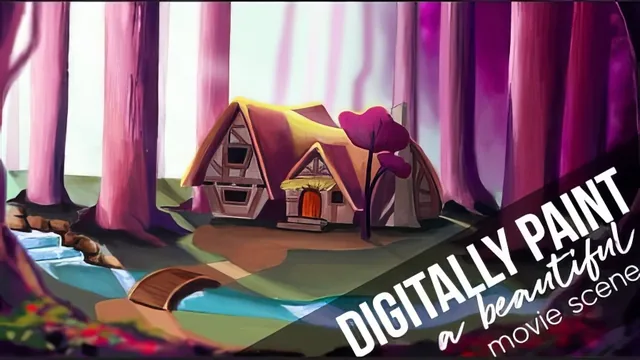
A working artist paints one atmospheric scene start to finish, but she narrates process far more than she explains why it works.
Chloe Rose's class promises a full pipeline for building a stylized concept scene, and it mostly delivers one, just not in the tidy, chaptered way the lesson list implies. The arc runs from Pinterest reference-gathering through rough sketching, block-in color, and a long stretch of iterative refining before a final polish pass. Anyone who follows along produces a complete painting of a cottage, water, trees, and a bridge, worked from a Disney-adjacent reference image and pushed toward a purple-and-orange palette instead of the original's colors.
What actually gets taught
The strongest material is the color and lighting reasoning threaded through the early lessons. The color wheel refresher lands on a genuinely useful idea: use complementary pairs like violet and yellow, or blue and orange, not by mixing them into mud but by placing them near each other so each pushes the other's saturation up. The lighting lesson before that sets up a simple mental model, treat sunlight like rain and shadows like the dry patch behind an umbrella, then holds to it consistently later when reasoning about which side of the house, trees, and rocks should catch light. That consistency is the class's real backbone: shadows are checked and rechecked against a single implied sun position all the way to the final lesson.
The technical highlight is a specific shadow-casting trick: select the house, copy-merge it into a new file, flip it vertically, paste it back, and use Edit > Transform > Skew to stretch it into a plausible cast-shadow shape. It is a rough-and-ready method, not physically exact, but it is the kind of concrete, reusable workaround worth the price of admission on its own.
Where it thins out
The lesson titles suggest a structured fifteen-part curriculum, but roughly half the runtime is labeled "More Refining" and plays out as extended, largely unnarrated color-picking and blending. That is honest about how painting actually works, but it also means long stretches offer little new instruction beyond restating "darken this because it is farther from the sun." Viewers hoping for a beat-by-beat breakdown of the final polish, the added flowers, rocks, bridge, and path, will find that section compressed and sped through rather than taught.
The class also never addresses the fact that it runs on Photoshop CS6, an outdated version, and assumes the viewer already knows their way around layers, opacity, flow, and selection tools. There is no keyboard-shortcut cheat sheet, no discussion of brush settings beyond "I use one brush mostly," and no real breakdown of composition theory beyond a passing comment about framing the cottage centrally. A true beginner will likely get lost within the first ten minutes of the sketching lesson.
Verdict
This works best as an over-the-shoulder study session with a working artist, not a structured curriculum. Someone who already paints and wants to see how a professional actually thinks through light, color harmony, and focus in real time will get real value, particularly from the shadow-skew trick and the complementary-color framing. Someone looking for a step-by-step beginner course, with software fundamentals and a tightly organized lesson plan, should look elsewhere.
The standout
The house-shadow trick, copying the object, flipping it vertically, then skewing it into a cast shadow shape, is a genuinely reusable workflow move rarely explained this plainly elsewhere.
What you will learn
- How to build a moody concept scene from a Disney-style reference using Pinterest for both composition and color research
- How to use complementary color pairs like violet-yellow and blue-orange to make a palette pop
- How to establish a single light source and keep shadows consistent with it throughout a painting
- A trick for building shadow shapes by flipping and skewing a copied object silhouette
- How to fake depth by darkening near objects and lightening ones further from the viewer
- How to use selective Gaussian blur and a small saturated focal area to direct the eye toward a house or subject
Best for: An intermediate digital painter who already knows Photoshop's basic tools and wants to see an experienced artist's real, messy layering and color-correction process on one full piece.
Skip it if: A true beginner unfamiliar with Photoshop's interface, layers, or blend modes, since the class assumes that fluency and never stops to explain the software itself.