
Create Paper Cuttings on Your iPad in Procreate + Digital, Hand Cut, and Cricut Machine Cutting
Liz Kohler Brown · artist | designer | teacher | author
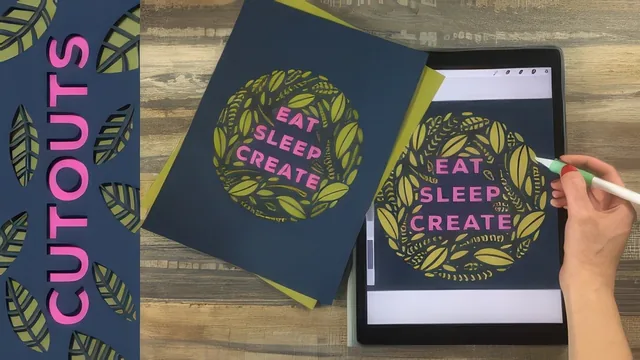
A three-in-one paper cutting workflow that goes from Procreate silhouette to X-Acto blade or Cricut machine in one sitting.
This class sits at the intersection of two crafts that rarely get taught together: digital illustration and physical paper cutting. Liz Kohler Brown treats them as one continuous pipeline rather than two separate skills, and that framing is the course's strongest organizing idea. A design starts as a traced silhouette on an iPad, gets broken into cuttable negative space, gets tested in color digitally, and only then becomes a physical object cut by hand or by machine. Anyone who has wondered how those intricate patterned animal prints on Etsy actually get made will find the real mechanics here.
Structure and the three projects
The course moves through three build-along projects of increasing complexity: a patterned elephant silhouette, an intricate mandala with a logo on the back, and a multi-color card combining hand lettering with plant forms. Each project reuses and extends techniques from the last, so by the third one the pacing assumes real fluency with Procreate's selection tool, alpha lock, and layer merging. The elephant project is where the core method gets taught: trace a reference photo at reduced opacity, fill the outline solid, then erase white lines through it to create the cut pattern. The mandala project shifts to a separate app, Mandala Kit, for building radial symmetry before bringing the shape back into Procreate for coloring and selection work. The final project is the most rewarding, showing how to slot a solid color piece behind cut lettering so it reads as a two-layer cutout rather than a flat print.
What the course actually teaches well
The technical explanation of pattern brushes, built with quadrant symmetry and inserted as a grain source rather than a shape source, is a genuinely useful piece of Procreate knowledge that goes beyond what most general Procreate classes cover. The rule about paper connectivity, that any white shape must touch another white shape or it will physically fall out when cut, is repeated at exactly the moments it matters, and it is the kind of practical constraint that separates someone who understands paper cutting from someone who just draws pretty patterns. The cutting sections are equally concrete: blade sharpness, mat handling, peeling technique that curves the mat rather than the paper, and a direct comparison of the Cricut's standard versus intricate double-cut settings.
Where it falls short
The course assumes a baseline of Procreate competence that beginners will not have. Selections, alpha lock, clipping masks, and layer blending are used constantly with only brief explanation, so anyone new to the app will need to pause frequently or take a beginner Procreate class first. The mandala section also depends on a separate third-party app, which adds friction and a small paid-upgrade decision outside the course's control. Time estimates for hand cutting are mentioned only in passing, and newcomers may underestimate how many hours a detailed piece actually takes with an X-Acto knife. Despite these gaps, the course delivers exactly what its title promises: a working method to take an iPad drawing all the way to a finished paper object, with honest tradeoffs laid out between the three output paths.
The standout
The explanation of why every white (paper) area in a cutout must stay physically connected to the rest of the shape, since it is the one structural rule that determines whether a hand cut or machine cut actually survives being peeled off the mat.
What you will learn
- Trace a reference photo into a solid silhouette in Procreate and save it as a reusable stamp brush
- Build seamless repeating pattern brushes using quadrant symmetry and grain source insertion
- Break up a silhouette into cuttable negative-space lines while keeping every white paper area connected
- Cut a design by hand with an X-Acto knife versus prepare and cut it on a Cricut machine, including the intricate cut setting
- Layer color, shadow, and paper texture onto a digital cutout to mock up the final piece before cutting
- Assemble a finished greeting card, including scoring, folding, and gluing layered paper colors
Best for: Ipad artists who already know basic Procreate navigation and want a repeatable path from digital drawing to a physical paper-cut product.
Skip it if: Total Procreate beginners who have never used layers, selections, or symmetry drawing guides, since the class assumes that fluency and moves quickly through the interface.