
Create & Design a Modern Interior in Blender
Stephen Pearson
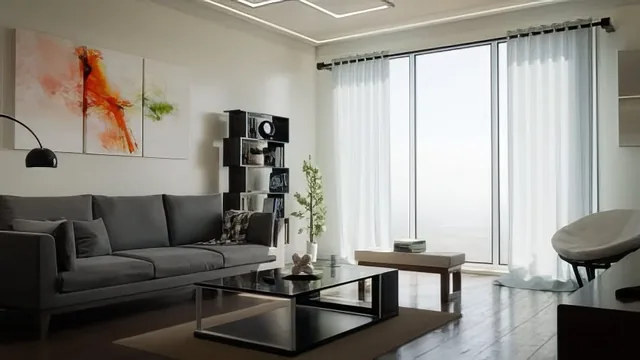
A modern-living-room build in Blender that trades broad theory for one long, replicable project with real assets attached.
Wait, "time_worth" must be one of the three exact strings. Let me redo that field.
{"hook": "A modern-living-room build in Blender that trades broad theory for one long, replicable project with real assets attached.", "what_you_learn": ["Blocking out an accurate real-world-scale room and openings using the Archimesh addon for windows", "Building PBR materials for wood flooring, trim, and walls with node-based roughness and color control", "Modeling a couch from primitives and simulating cushions and a throw blanket with cloth physics", "Tagging finished models as assets and reusing them through Blender's Asset Browser", "Setting up HDR-lit interior lighting, multiple camera angles, and compositor post-processing", "Rendering the same scene as a daytime Cycles image, a clay preview, a night version, and an Eevee bake"], "standout": "The full pipeline for modeling, cloth-simulating, and asset-tagging the couch so it can be dragged into any future scene through the Asset Browser is the course's most transferable skill.", "best_for": "Blender users who already know basic navigation and modeling and want a guided path into architectural interior rendering with a finished portfolio piece.", "not_for": "Total beginners to 3D or anyone wanting deep material-authoring theory rather than a step-by-step, click-along build.", "rating": 7, "time_worth": "Deep dive"} ===REVIEW===
A single project, built from empty scene to finished render
This course has one goal: take a blank Blender file to a fully dressed, photorealistically rendered modern living room, and it structures every lesson around that single arc. It opens with a short, genuinely useful primer on interior design fundamentals, covering balance, unity, rhythm, emphasis, contrast, scale and proportion, and detail, illustrated with real reference photos rather than abstract rules. That section is brief but it gives the modeling work that follows an actual design rationale instead of arbitrary placement decisions.
From there it moves into a compact Blender refresher covering viewport navigation, transform shortcuts, and edit mode basics, useful for anyone rusty on fundamentals but skippable for confident users. The room itself is built to real-world scale from the start, with dimensions set deliberately so later furniture models read as believable sizes rather than guesswork. The Archimesh addon handles the window opening, which is a practical shortcut but also means the course leans on a tool rather than teaching manual hole-cutting technique.
Materials, models, and the couch as the centerpiece
The materials pass is where the course earns its keep. Wood flooring, trim, and ceiling all get individually tuned Principled BSDF setups, with roughness values and subtle color tints dialed in by eye rather than copied from a preset, and the course explains why each choice reads as more or less realistic. The couch build is the clear centerpiece: a full modeling pass using mirror modifiers and bevels for the frame, followed by a cloth simulation pass for the cushions and a separate pillow-and-blanket simulation, then a fabric material and UV setup. Packaging that couch as a reusable asset through the Asset Browser is taught cleanly enough that it becomes a skill viewers can apply well beyond this one project, not just a one-off trick for this scene.
The back half is largely assembly and dressing: importing the seventeen bundled models (bookshelf, coffee table, TV stand, lamps, plants, rugs), placing them with snapping and alignment techniques, then adding a canvas, mirror, and curtains as final set dressing. A separate lesson builds a coffee table from scratch, mirroring the couch's modeling logic with legs, a glass-look tabletop material, and a bevel pass, which is a good reinforcement of the technique but does start to feel repetitive by that point in the course.
Where it delivers and where it thins out
The rendering stretch is genuinely strong. It covers multi-camera batch rendering, fixing a stereoscopy bug that distorts camera views, saving separated output images, a clay render for client presentations, a nighttime relight, and a full Eevee bonus pass with baked lighting. That breadth of rendering scenarios is more than most interior-focused courses bother to cover.
The tradeoff is that the course is almost entirely procedural. It shows exactly what to click and why for this one room, but it rarely steps back to teach the underlying principles of UV unwrapping, node theory, or cloth simulation settings in a way that transfers cleanly to a different room layout. Anyone who follows along will end up with a finished, good-looking render and several reusable assets, but building a second interior from scratch afterward will still require some trial and error.
The standout
The full pipeline for modeling, cloth-simulating, and asset-tagging the couch so it can be dragged into any future scene through the Asset Browser is the course's most transferable skill.
What you will learn
- Blocking out an accurate real-world-scale room and openings using the Archimesh addon for windows
- Building PBR materials for wood flooring, trim, and walls with node-based roughness and color control
- Modeling a couch from primitives and simulating cushions and a throw blanket with cloth physics
- Tagging finished models as assets and reusing them through Blender's Asset Browser
- Setting up HDR-lit interior lighting, multiple camera angles, and compositor post-processing
- Rendering the same scene as a daytime Cycles image, a clay preview, a night version, and an Eevee bake
Best for: Blender users who already know basic navigation and modeling and want a guided path into architectural interior rendering with a finished portfolio piece.
Skip it if: Total beginners to 3D or anyone wanting deep material-authoring theory rather than a step-by-step, click-along build.