
Character Illustration: Create a Character with Photoshop & Watercolor
Cosmic Spectrum Yana Bogatch · Illustrator and Comic Artist
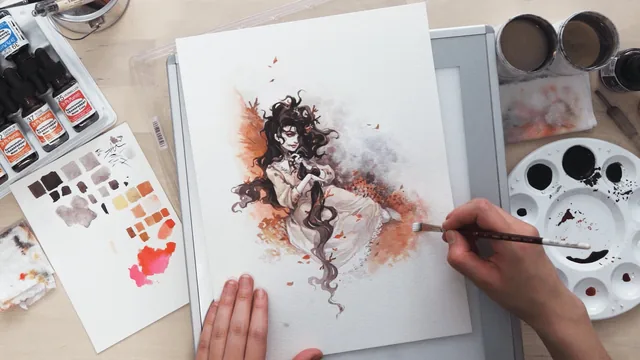
A fast, personality-driven walkthrough of Yana Bogatch's mixed-media process, but 52 minutes covers a lot of ground with little pause.
Yana Bogatch's class is built around a single demonstrated workflow: warm up on paper, thumbnail a composition, refine that sketch digitally in Photoshop, print and transfer it to watercolor paper with a light box, ink the linework, then layer watercolor and finish with gouache and colored pencil. The structure mirrors how Bogatch actually works on personal illustrations, and the course benefits from that authenticity. Nothing here is theoretical. Every step is presented as "this is what I do," down to specific brand names: a Muji ballpoint for sketching, Dr. Ph. Martin's ink in matte and glossy, Winsor & Newton colored inks mixed into black for hue, a Deleter Genome nib, and Dr. Martin's Synchromatic watercolors for their clean mixing and brightness.
What the process actually teaches
The most transferable idea in the class is mixing colored ink into black ink before any linework begins, rather than inking in flat black and adding color later. It sets a warm or cool undertone for the whole piece from the first line drawn, and it explains why the finished character reads as cohesive rather than as a black outline with color dropped in behind it. The companion idea, choosing an analogous color scheme (colors adjacent on the wheel) so that ink and watercolor share the same family, is presented as a low-risk choice for anyone unsure how to build a palette, and it is a genuinely useful rule of thumb beyond this one project.
The detail-hierarchy advice, finish the face first because mistakes there are the least forgivable and the least fixable, then the hands, then let the hair and clothing stay looser, is standard studio wisdom, but it is delivered with enough specificity that it functions as more than a platitude. The tracing lesson on using colored pencil to transfer a Photoshop sketch onto watercolor paper (so the light box doesn't need to stay on and washing ink doesn't fight against light bleeding through the page) is a small but genuinely practical fix for a problem hybrid illustrators run into constantly.
Where it comes up short
Because the class runs under an hour, several of the most technically demanding stages get compressed into narration over quick footage rather than a walked-through demonstration a viewer could follow along with in real time. The wet-on-wet ink and watercolor blending, arguably the hardest skill in the whole process to control, is shown but not broken into a repeatable step anyone without prior painting experience could reproduce reliably. Warm-up sketching and figure construction (rib cage, pelvis, line of action) are mentioned rather than taught, which means the class assumes a working knowledge of anatomy and gesture drawing that a true beginner won't have.
The project itself, one finished mixed-media character illustration, is well-scoped and satisfying to complete, but the course functions best as a demonstration of a professional's shortcuts rather than a ground-up skill-building curriculum. Anyone who already sketches and wants to see how digital and traditional media can combine will get real value quickly. Anyone starting from zero will need supplementary anatomy and watercolor-control resources to keep pace.
The standout
The demonstration of mixing colored ink into black ink before inking begins, which sets a cohesive hue for the whole piece and separates this process from a generic black-and-white lineart approach.
What you will learn
- How to structure a warm-up-to-final workflow: gesture warm-ups, thumbnail composition, Photoshop refinement, light box transfer, inking, and watercolor
- How to mix ink with colored ink to create a custom hue rather than using ink straight from the bottle
- How to use a light box and colored pencil to transfer a printed digital sketch onto watercolor paper without leaving light-box glare in the final piece
- How to build an analogous color scheme around a single ink tone for cohesive results
- How to prioritize detail hierarchy, finishing the face and hands first since they carry the most anatomical and expressive weight
- How to use white gouache and colored pencil as finishing tools to punch up highlights and refocus the viewer's eye
Best for: Illustrators who already sketch digitally and want a concrete bridge into traditional ink and watercolor finishing.
Skip it if: Complete beginners with no drawing or anatomy foundation, since the warm-up and sketching lessons assume that skill already exists.