
Character Animation: Creating Authentic Facial Expressions in Adobe After Effects
Fraser Davidson · Designer / Director / Animator
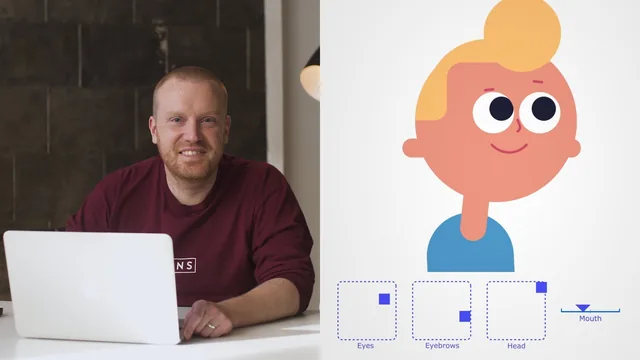
A tight, well-taught rig-building workflow built entirely around one paid plug-in you must own to follow along.
What it actually teaches
This course is a single, continuous build: one character, illustrated, rigged, and animated across seventeen short lessons. Fraser Davidson starts in Illustrator, drawing a simple round-headed character with circles and rounded rectangles, then walks through the unglamorous but essential step of separating every part (pupils, eyes, eyebrows, nose, mouth, hair front, hair mid, hair back, ears, neck, torso) into its own labeled layer so After Effects can read them individually. From there the course moves into rigging: parenting layers to each other, relocating anchor points with the pan-behind tool so pieces rotate from believable pivot points rather than their default centers, and using alpha mattes so hair and pupils stay contained within their masks as they move.
The most technically interesting stretch is the nose. Davidson converts the vector nose into an editable shape layer and applies a trim paths effect, animating the start and end points so the stroke appears to slide and bridge across the face as the head turns, faking a sense of three-dimensionality on a flat illustration. It is a clever, specific trick that goes beyond generic 2D puppet work.
The core mechanic and where it lands
Everything builds toward Joysticks n' Sliders itself: the course teaches a consistent five-keyframe pattern (center, right, left, up, down) applied to eyes, eyebrows, a mouth shape, and finally a full head rig combining rotation, position, and the trim-path nose animation. Once keyed, each set collapses into a single draggable controller, and the final animation lesson shows how to layer performance on top: eyes leading the head by a few frames, eased arcs instead of straight lines, eyebrows and mouth reacting a beat after the head settles. That timing lesson is genuinely useful animation theory, not just software mechanics, and it is the part most transferable to other tools and rigs.
Where the course is limited is scope. The character is deliberately minimal, a face with no arms, body language, or secondary rig complexity, so viewers hoping to rig a full character will need to extrapolate a lot on their own. The course also assumes the viewer already reads Illustrator layer panels and After Effects parenting comfortably, and it moves fast through steps like precomposing and matte assignment without pausing to explain the underlying After Effects concepts.
The larger issue is dependency. Every lesson after the second one requires Joysticks n' Sliders installed and licensed, so the course is really documentation for a specific commercial plug-in wrapped in a facial-animation lesson. Anyone unwilling to buy or trial that tool gets a rigging refresher but cannot complete the actual joystick and slider workflow the course is named for. Within that narrow lane, though, the instruction is efficient, specific, and free of padding, covering the full pipeline from blank Illustrator canvas to a finished, expressive animated loop in a little over an hour.
The standout
The five-position keyframe method for building a single joystick controller that drives eyes, eyebrows, and a full 3D-feeling head turn from one dot.
What you will learn
- How to prep a character illustration in Illustrator with correctly labeled, z-ordered layers for animation
- How to import a layered Illustrator file into After Effects as a composition and clean up anchor points and parenting
- How to build a joint hierarchy (torso to neck to head to features) using parenting and pan-behind anchor adjustments
- How to convert vector shapes into editable paths and use trim paths to fake a nose turning in 3D
- How to key five-position rigs (center, left, right, up, down) and convert them into single-controller joysticks and sliders
- How to sequence facial animation with offset timing, eased arcs, and overshoot so eyes lead the head and expressions land after
Best for: After Effects users with working Illustrator and AE fluency who want a repeatable rigging method for simple 2D character faces.
Skip it if: Beginners to After Effects or Illustrator, or anyone unwilling to buy or trial the Joysticks n' Sliders plug-in the entire course depends on.